VOLBOT docs
VOLBOT is a dashboard for launching on pump.fun and everything around it: funding your wallets from any chain, volume, strategies, take-profit, selling and tracking. Sign in with your wallet and you get your own isolated bot.
Sign in #
Open the app and sign a message with a wallet that holds $VOLBOT (Phantom, Solflare or Backpack). Signing costs nothing and sends no transaction. You get your own bot, separate from every other user. Paste your own RPC endpoint in the dashboard. Keys you paste are kept in memory for your session and never written to disk; use fresh wallets with only the SOL you need.
Tiers. What you can use depends on how much $VOLBOT the signed-in wallet holds, checked at sign-in and every 10 minutes: Starter 10k (normal volume, 5 wallets, 0.5% fee), Holder 500k (+ spread, ping pong, take-profit, grid, volume sell, 15 wallets, 0.3%), Pro 1.5M (+ wash and bundle mode, snipers, Sniper Guard, 30 wallets, 0.15%), Whale 5M (everything, no wallet limit, 0.1%). The fee is a share of each volume trade, sent in the same transaction; launches, sell all, dev sell and take-profit sells are free. Your tier shows bottom right in the app.
Settings #
Everything is set in the dashboard. There is no settings file and nothing to install or restart.
| Setting | What it does |
|---|---|
| RPC endpoint | Your own Solana RPC, used only by your bot. Press Test RPC to check it. A free Helius RPC is fine to start; for volume, ping pong or many wallets use a paid one (Helius, QuickNode, Triton). Your browser remembers it. |
| Wallets | Paste or generate them in the dashboard. They stay in memory only, see Wallet list. |
| Everything else | Jito, pump.fun and Jupiter settings are managed on the server, you don't need your own keys for them. |
Quick start: running volume #
Five steps from an empty dashboard to volume on a token.
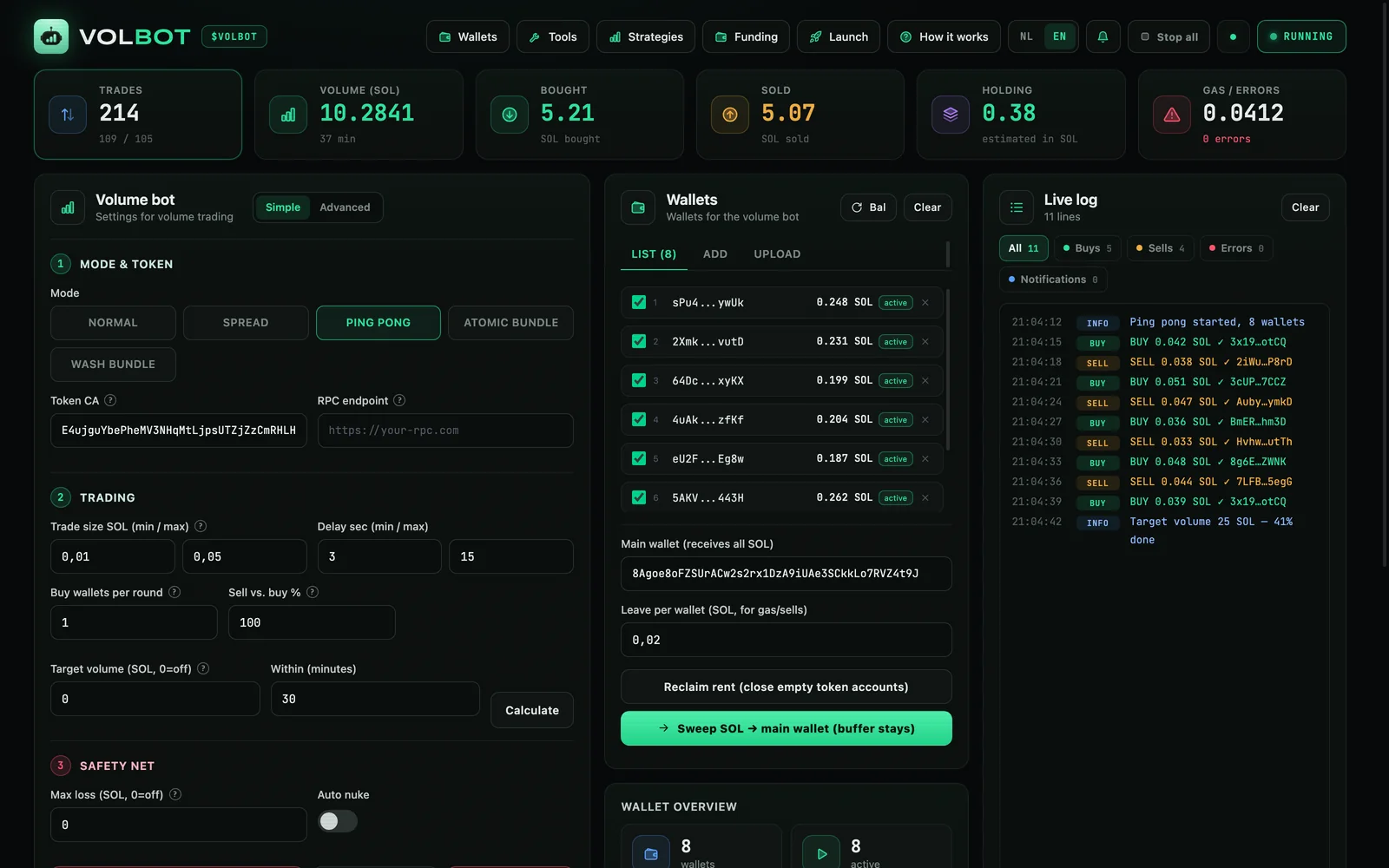
- WalletsCreate wallets in Wallets → Generator, or paste keys in the middle column under Add / Upload.
- FundSend SOL to them with Wallets → Funder. Each wallet needs SOL for trades plus gas.
- ConfigurePaste the token CA and your RPC, pick a mode and amounts, and set up the safety net. Click Save to keep the settings.
- StartClick START. The cards at the top and the log show what's happening. The same button stops it.
- Wrap upSell with Sell all and pull the SOL back with Sweep → main wallet.
Launch a token #
Create a token on pump.fun. The dev buy and your bundler wallets buy in the same block, in one Jito bundle.
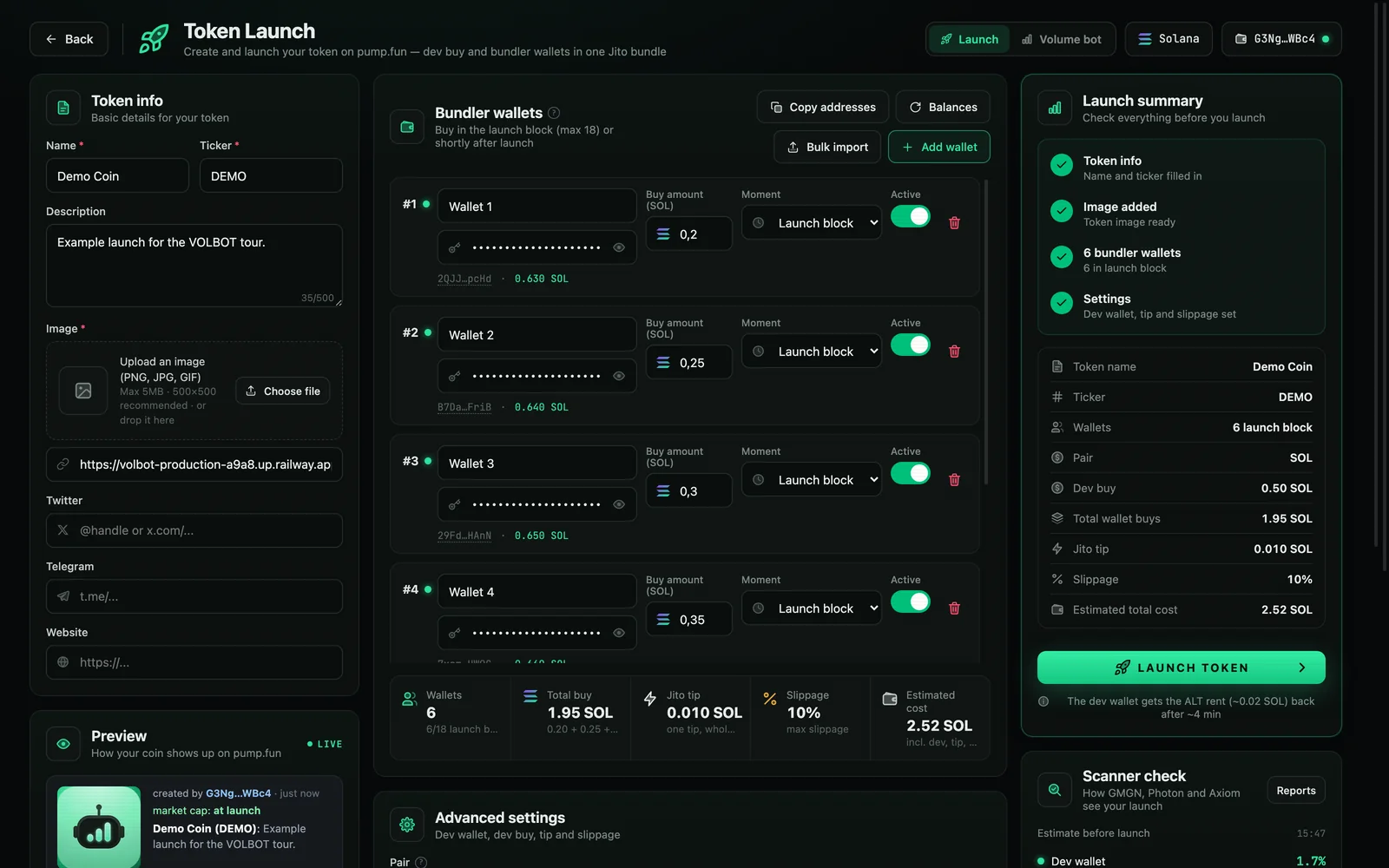
- TokenName, ticker, image, description and socials. The image goes to IPFS through pump.fun.
- Dev wallet and dev buyUnder Advanced settings. The dev wallet creates the token and receives the creator fees.
- Bundler walletsOne amount per wallet. See Bundler wallets.
- Check the summaryAll four checks must be green. The scanner check shows how your launch will look to buyers.
- LaunchClick LAUNCH TOKEN, then again within 6 seconds to confirm. A pre-flight simulation runs first; if anything is wrong, nothing is sent.
What happens behind the scenes
- A lookup table is created first (about 0.017 SOL rent). It fits up to 18 bundler wallets into one bundle and is closed after about 4 minutes, so the rent comes back. If the server restarts in between, it's closed on your next launch.
- After a successful launch, the CA and your bundler wallets are loaded into the volume bot. The dev wallet never goes there, and the volume bot doesn't start by itself.
- If the bundle doesn't land, no token is created and you only lose some fees.
Alt+L or the switch at the top right moves between Launch and the volume bot.
Bundler wallets #
- Launch block
- The wallet buys inside the launch bundle, right after the dev buy, with nobody in between. Up to 18 wallets, or 12 with a USDC or stock pair.
- After x–y s
- A separate buy a random number of seconds after the launch. It isn't atomic: others can buy first, and it can fail.
- Bulk import
- Paste keys one per line, optionally with an amount (
key 0.25), or load a wallets.txt. - Random amounts
- Gives every active wallet a random amount between min and max.
- Balances
- Reads each wallet's SOL. One wallet short makes the whole bundle fail, so the page warns you first.
Scanner check new in 1.1 #
Scanners like GMGN, Photon and Axiom show buyers how much of a token sits with the dev, in the launch block and in the top 10 wallets. The scanner check shows you those numbers before you launch.
While you fill in amounts, VOLBOT calculates each buy on the real pump.fun curve, in launch order, and turns it into a share of the supply. Only the amounts go to the server, never your keys.
| Number | What it is | Green | Orange | Red |
|---|---|---|---|---|
| Dev wallet | Share bought by the dev | under 5% | 5–10% | 10%+ |
| Launch block | Dev plus every wallet in the bundle | under 15% | 15–25% | 25%+ |
| Top 10 holders | The ten largest wallets | under 25% | 25–35% | 35%+ |
After launch, Live check reads the real top holders from the chain. The curve and pools don't count as holders, the same way scanners treat them.
SOL, USDC & stock pairs #
A token can be paired against SOL (a normal pump.fun launch), USDC, or one of the tokenized stocks pump.fun allows.
- Pick the pair under Advanced settings → Pair. The dev buy and wallet amounts are then in that token.
- Prepare wallets swaps SOL to the pair token in every wallet through Jupiter. Keep about 0.01 SOL extra per wallet for fees and rent.
- With another pair, 12 wallets fit in the launch block instead of 18.
- Selling returns the pair token. With Quote pair: swap proceeds back to SOL on, VOLBOT swaps it back to SOL per wallet, for manual sells and for the volume bot.
Sniper Guard #
Watches buys from outside wallets right after your launch.
Set a threshold in SOL and a time window. If others buy more than that, Sniper Guard cancels your scheduled After x–y s buys, and can also sell your bundler wallets in one bundle. It never sells the dev wallet.
Launch reports new in 1.1 #
After every launch, a report shows per wallet what it bought, how many blocks after the launch, what it spent and what it holds now.
The report is made a few seconds after the launch lands, and again once the scheduled buys are done. Open it with Reports in the scanner check card. Refresh updates holdings and value; Download CSV saves it as a spreadsheet, with transaction signatures.
- Block
- How many blocks after the launch the wallet bought.
+0means inside the launch block. - SOL out
- What the wallet spent on the buy, including fees, rent and, for the dev, the Jito tip.
- Bought / Now
- Share of the supply at the buy, and now.
Sells aren't in the report; those are under Profit & loss. Reports store only public addresses and numbers.
Creator fees #
The card on the launch page shows the creator fees you can claim, from the curve and, after graduation, from PumpSwap. Claim sends them to your dev wallet.
Volume modes #
The volume bot trades one token with all your active wallets. Before graduation it trades straight on the pump.fun curve, after graduation on PumpSwap. It switches by itself.
- Normal
- Each round a random wallet buys or sells. Buy ratio sets how often it's a buy. If a wallet can't do that side, it flips.
- Spread
- Per wallet: buy, hold for at least the hold time, then sell at the take-profit % or stop-loss %. With Sell after time it always sells after the hold.
- Ping pong
- A few wallets buy, then 1 to 3 others sell back about the same. Sell vs. buy % steers the chart: 100 keeps it flat, 90 lets it climb slowly. Auto top-up moves SOL to empty buyers. Best for a low market cap.
- Atomic bundle
- Buy, sell and tip from the same wallet in one Jito bundle. It all lands or nothing happens. Lots of volume with little price risk, but you pay the tip every round.
- Wash bundle
- One wallet sells and another buys back the same tokens in one bundle, so the price stays flat while volume grows. You can pick which wallets sell and which buy. The cost is two pump.fun fees (~2%) plus the tip. Test mode only simulates.
Trading & safety net #
- Trade size, delay
- Picked at random between min and max for every trade.
- Safety net
- Stops the bot on too much loss, when the price falls under a limit, or on a crash of x%.
0turns a brake off. - Jito bundles
- The tip for bundle modes. Auto tip raises it when bundles don't land; Max loss guard skips rounds that cost too much.
Target volume #
Enter how much volume you want and within how many minutes, then click Calculate. The bot sets the pacing, shows roughly what it costs and which wallets are short on SOL, and stops by itself when the target is reached.
Volume sell & replication #
- Volume sell
- Sells a % of every buy from others, live, spread over your selected wallets. Buys from your own wallets are ignored. Needs
PUMPPORTAL_API_KEY. - Replication
- Buys in when someone else makes a large sell.
Sell buttons #
Every sell button needs a second click within 4 seconds. The first click only turns it orange.
- Sell holdings
- Takes profit in pieces: per click a few random wallets each sell a %. It can skip wallets that aren't in enough profit yet.
- Sell all
- Sells every wallet in one Jito bundle with 5% slippage: same block, all or nothing. If it doesn't land, it retries once with a double tip, then sells one wallet at a time.
- Nuke
- The same with 10% slippage, for when the price is dumping and landing matters most. About 15 wallets fit in one bundle on the curve, 5 after graduation.
Take-profit #
Sells automatically as the market cap rises, so you don't have to watch the chart.
Two ways to set targets
- Market cap ($)
- A list of targets like
30k, 60k, 100k. At each target the selected wallets sell a %. - × steps
- First sell at, for example, 2× the price at start, then every further 1.5×, up to a max number of steps.
Per wallet
- Pick exactly which wallets sell. This list is separate from the volume bot.
- Give a wallet its own targets (for example 38k, 40k, 41k) and its own sell %. Empty means the general setting.
The price is checked every second. A failed sell is retried up to 3 times. Progress survives a server restart: after you refresh the dashboard, take-profit continues and skips targets it already hit.
Sell dev #
The one place where the dev wallet can be sold: 25%, 50% or 100%, with a second click to confirm. It uses the dev wallet from the launch page.
Wallet list #
- List
- Your wallets with balances. The checkbox picks which wallets take part.
- Add / Upload
- Paste private keys, one per line, or drop a .txt file.
- Reclaim rent
- Closes empty token accounts. Each returns about 0.002 SOL. Do this after a nuke.
- Main wallet + Sweep
- Sends all SOL back to your main wallet and leaves a small buffer in each wallet for gas.
Wallet manager #
- Generator
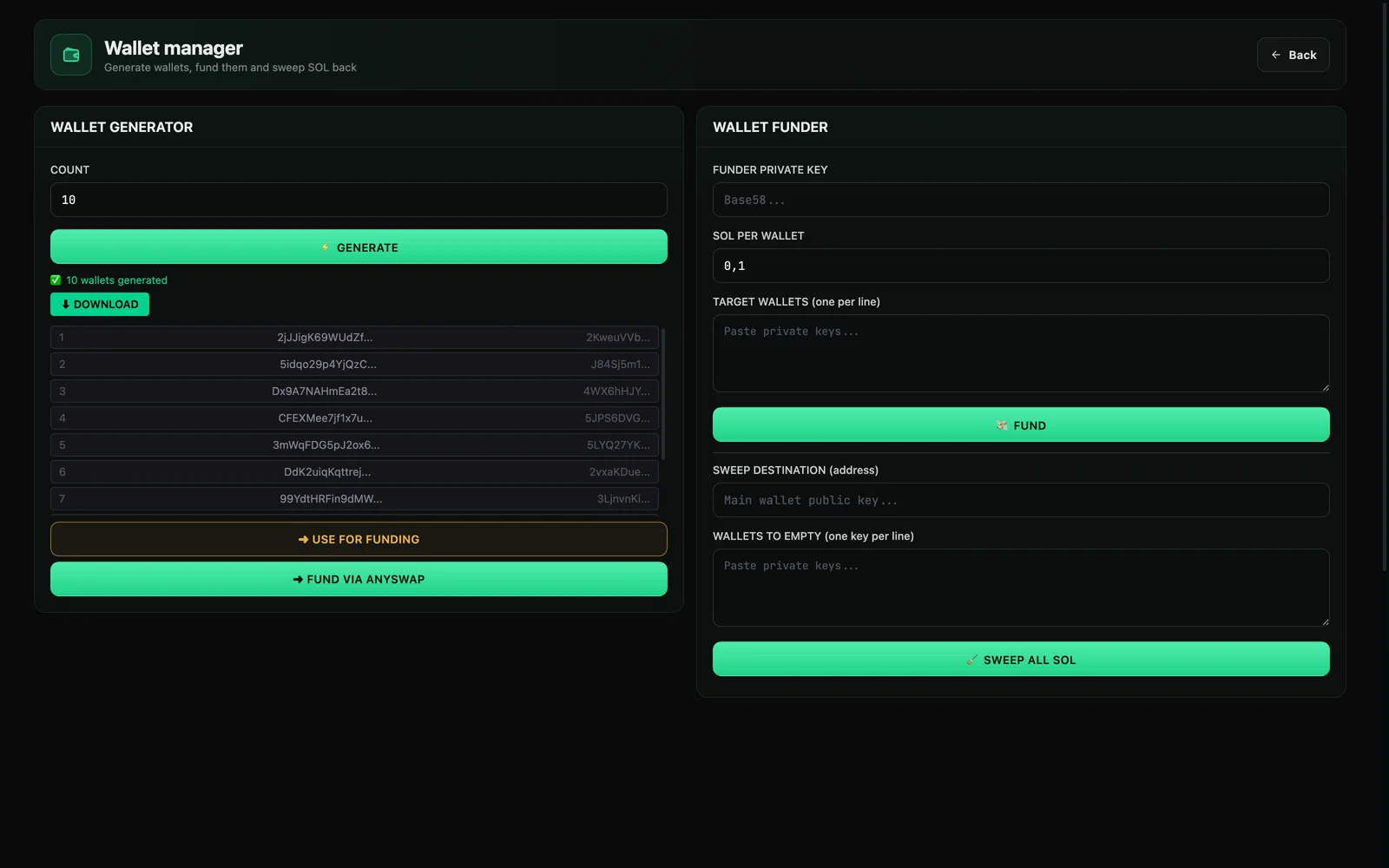
- Creates new wallets and can download them. Keep that file safe: it holds your private keys. Fund via AnySwap puts the new wallets straight into Funding.
- Funder
- Sends a fixed amount of SOL from one wallet to a list of wallets.
- Sweep
- Empties a list of wallets to an address you choose.
Funding new in 1.2 #
Fund many wallets with one deposit, from any chain. You pay with SOL, USDT, USDC, ETH, BTC, BNB, TRX or LTC; AnySwap converts it to SOL and pays every wallet its share. Open it with Funding in the top bar.
- Pick what you pay withChoose the coin and network and enter the amount. Receive shows the SOL you get, the rate, the minimum and the expected time.
- Add walletsFrom wallet list picks wallets from your dashboard, Add bulk takes pasted addresses, Batch import takes CSV or JSON. Pasted private keys are turned into their address in your browser and never sent.
- Set split, provider and timingPer wallet: its %, the provider that pays it out and a delay in minutes. Randomize, Presets and Reset do this for all wallets at once.
- Exchange nowYou get one deposit address under Your orders. Send exactly the amount shown, on the network shown.
- Follow itEach wallet shows its status (waiting, scheduled, sending, done) and a tx link once paid. Send now skips the delay for a scheduled wallet.
- Providers
- AnySwap, Binance, Bybit, KuCoin, GATE, Bitget, Whitebit and Husher. Each wallet can use a different one.
- Presets
- Quick Send: a fixed time gap between wallets and no provider twice in a row. Enhanced Privacy: providers in order or at random, with a random delay between your min and max. My presets saves a whole setup to reuse.
- Batch import
- CSV columns
address,percentage,provider,timeDelay, or the same fields as JSON. Download template gives a file with your own wallets; Export saves the current list. - Costs and limits
- About 0.45% plus network fees, shown before you confirm. Minimum about $9 per order and about 0.011 SOL per wallet. Up to 100 wallets per order, 20 orders per hour.
- Privacy
- Only wallet addresses are sent to AnySwap. Your orders list keeps public order data only.
Profit & loss #
Below the wallet overview. It compares the SOL in all your wallets and your main wallet with the start (for a launch: just before it), plus what your tokens are worth now.
- Per wallet: in and out per wallet, token value, and which one is the dev.
- Earlier tokens: the last result of tokens you ran before.
- Reset starts counting again.
Stop all #
Stop all in the top bar stops everything that buys or sells by itself: the volume bot, take-profit, volume sell, strategies, Sniper Guard and scheduled launch buys. The number next to it shows how many are running. It asks for a second click.
After an update #
When we update the server, your bot restarts. Keep the dashboard open: within a few seconds it reconnects, hands your wallets back, and a volume bot, volume sell or strategies that were running start again by themselves. Take-profit continues too, and funding orders keep going at AnySwap regardless. If the page was closed for more than 10 minutes, nothing restarts and a banner shows what was running, so you can check first.
Your wallets live in memory, not on disk. A refresh keeps them; close every tab and they're gone.
RPC #
Your bot uses only the RPC you paste. When it hits its rate limit (429) the dashboard shows a warning under the RPC field and trades can fail: slow the bot down or switch to a paid RPC. Logs show only the host name, never the URL with your API key.
Bundles overview #
In Advanced mode, the Bundles button shows the last 60 Jito bundles: what they were for, whether they landed, and Jito's message when they didn't.
Telegram alerts #
Not in the hosted app yet. Follow the live log in the dashboard; launches, take-profit hits, failed bundles and the emergency stop all show there.
Confirming amounts #
From a total you set under Tools → Confirm (1 SOL by default), FUND shows the amount on the second click and a manual snipe asks for confirmation. Automatic actions never ask.
Tools #
- Cleanup
- Gradually moves tokens from seller wallets to buyer wallets: each round one sells a %, another buys back.
- Send tokens
- Splits tokens from one wallet over recipients with
address:%. Percentages are of the starting balance. Works with Token-2022. - Burn
- Permanently destroys a % of your tokens and lowers the supply. This can't be undone.
Strategies #
Automatic buy and sell rules with their own Start strategies and Stop; the volume bot can stay off. They use your checked wallets, never the dev wallet. Amounts and intervals can be a range, so every round is different.
- Auto-buy: time-based
- Buys a random amount in your range with a random wallet, at random intervals, until a max SOL (0 = no limit).
- Auto-buy: dip buy
- Buys when the price falls a set % below its latest top. After a buy it waits for a new drop, with a cooldown.
- Auto-sell: time-based
- Each round sells a % of one random wallet that holds tokens, up to a max number of rounds. Stops when the wallets are empty.
- Auto-sell: trailing stop
- Follows the highest price since start. If the price falls a set % below it, sells a set % from every wallet, once.
- Presets
- DCA in, Buy the dip, Slow exit and Trailing stop add a ready-made rule in one click.
- Live status
- Per rule: rounds, SOL spent or received, time to the next round or distance from the top, and a pause button. Strategies continue after a server update, and Stop all and Sell all stop them.
Troubleshooting #
- Top bar says STOPPED
- The connection to your bot dropped, usually during a server update. Wait a few seconds and refresh the page; sign in again if it asks.
- Bundle doesn't land
- The tip is usually too low. When it's busy, use 0.005 SOL for volume or 0.01 SOL for a launch. The Bundles overview shows Jito's message.
- "Quote HTTP 429"
- Jupiter's rate limit. Tokens on the curve trade directly and don't need Jupiter; after graduation, wait a moment and it retries.
- Launch: too little SOL
- One wallet short makes the whole bundle fail. Click Balances and top up the wallets marked orange.
- Costs
- Every trade and every bundle costs fees. Keep an eye on the Gas and Volume cards.